


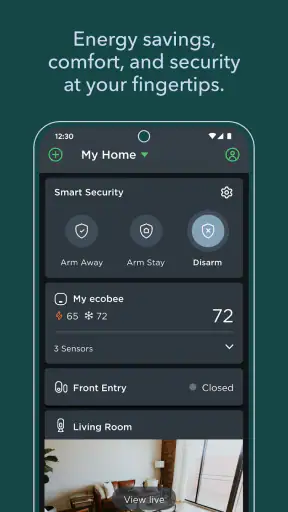
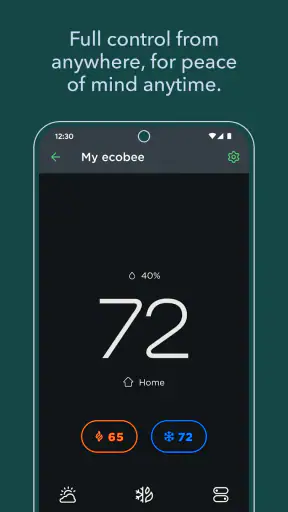
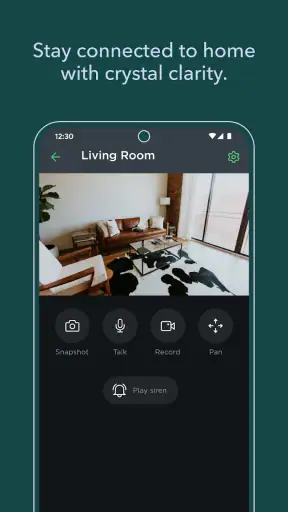
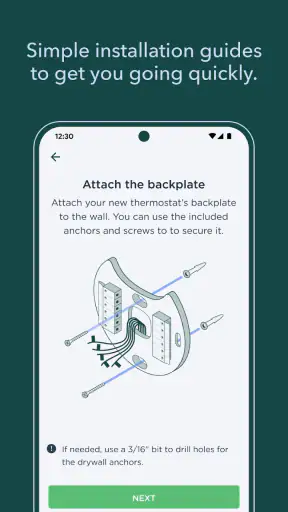
I use a home-control app differently from an entertainment app: I open it when the room feels wrong, when I am leaving, or when I want to check the house without walking to the thermostat. That is where ecobee makes sense. It puts thermostat control, comfort adjustments, and home monitoring in one phone-based experience, so the useful question is not whether it looks exciting, but whether it removes small points of friction from daily life.
In my experience, the app is most appealing to people who already use an ecobee thermostat or related ecobee equipment. It is free, aimed at Everyone, and comes from ecobee inc., the developer behind the hardware and service. The app sits in the House & Home category, and its popularity is easy to understand: it has passed one million installs, with a 4.4 average from roughly forty-one thousand ratings and about eleven thousand written reviews. Those figures suggest a mature, widely used companion rather than an experimental utility.
I would not install it expecting a universal remote for every brand of heating or cooling equipment. Its value is tied to the ecobee setup in your home. If that matches what you own, the phone becomes a convenient second interface for temperature changes and monitoring. If you have no compatible ecobee equipment, there is little reason to make this your main home app.
How quickly it feels useful in ordinary situations
The first thing I notice with a thermostat app is how quickly I can reach the action I need. ecobee is built around a simple pattern: open the app, check the home state, and make an adjustment without going to the wall-mounted thermostat. That makes it especially handy when I am already in bed, carrying groceries, or sitting in another room and do not want to interrupt what I am doing.
Perceived speed is not only about how fast a screen appears. It is also about whether the app makes the next step obvious. A temperature control that is easy to understand is more valuable than a crowded dashboard full of controls I rarely use. Here, the practical advantage comes from having comfort and monitoring together. I can think about the house as one system instead of switching between a thermostat tool and a separate home-monitoring service.
A realistic example is arriving home after being away. I can check the home from my phone before settling in, then adjust comfort if the current setting is not suitable. The useful part is not merely remote access; it is the ability to make that decision from wherever I happen to be. For households with different routines, that can prevent the familiar problem of heating or cooling an empty home simply because nobody remembered to change the setting.
There is a trade-off, though. A phone is not always the fastest control surface. If I am standing beside the thermostat, touching the physical device can be more direct than unlocking a phone and opening an app. The app earns its place when distance, timing, or convenience matters. It is less compelling for someone who always wants to make changes locally and never checks the home while away.
What happens when I use it during busy household moments
Heavy use for this app does not mean rendering a complex game or editing video. It means checking the home repeatedly, changing comfort while moving between rooms, and using the monitoring side at the same time as thermostat controls. I judge it by whether it remains understandable when my attention is divided.
That matters in a busy household. One person may want a cooler bedroom, another may be working in a warmer room, and someone else may be checking the home from outside. An app like this has to keep the difference between a temporary comfort change and the broader home setting clear enough that a quick tap does not create confusion later. My advice is to pause after making an adjustment and confirm that the displayed state matches what I intended, especially when several people control the same home.
The combined focus on comfort and monitoring is one of the less obvious strengths. Many people think of a thermostat app as a single-purpose temperature remote. ecobee is more useful when I treat it as a household overview: comfort is one reason to open it, but checking the home is another. That combination can reduce app switching and makes the phone more relevant during travel, workdays, and evening routines.
At the same time, combining functions can create more visual and mental load than a dedicated thermostat control. Someone who wants only a large temperature adjustment may prefer the simplicity of the hardware interface. I would use the phone app for remote decisions and the physical thermostat for quick changes when I am already nearby. That division keeps each control method in the situation where it is strongest.
Stability and recovering from an interrupted session
For a home-control tool, reliability is more important than visual polish. I need confidence that I am looking at the current home state, not an old screen left open from earlier. I also want a clear path back into the app after putting my phone down, switching to another task, or losing the moment when I first opened it.
My practical habit is to treat every important change as a two-step process: make the adjustment, then look again at the displayed state before closing the app. That is useful with any remote-control system, but especially so when comfort changes have consequences for the rest of the household. It also helps after returning to the app from the background, because I can confirm that the screen reflects the current situation rather than relying on memory.
This recovery habit is more valuable than it sounds. Imagine checking the home during a commute, changing a comfort setting, and then receiving a call before you finish reviewing the screen. When you return later, do not assume the unfinished session tells the whole story. Reopen the relevant view and verify the home state. The app is convenient, but remote control should still be handled deliberately.
I also recommend keeping the physical thermostat familiar to everyone in the home. The phone is not a replacement for basic local control. If a family member does not use the app, or if a phone is unavailable, the household should still know how to manage comfort at the thermostat itself. That is a general resilience tip, but it is particularly sensible for a system that places so much control in a mobile device.
Device limits and the role of the phone
Because ecobee is a mobile companion, the quality of the experience depends partly on the phone itself. A small screen can make detailed home information less comfortable to inspect than a larger display, while an older or crowded device may make any home-control app feel less immediate. I would not judge the thermostat hardware solely by how the phone feels, because the app is only one route into the system.
The phone also introduces practical constraints that a wall control does not. It may be in another room, with its battery low, or being used by someone else. Notifications and calls can pull attention away just when I am making a change. For that reason, I see the app as an extension of the home rather than the only control point. It is strongest when the phone is available and I need access from a distance.
There is another important constraint: the app makes the most sense inside the ecobee ecosystem. That is not a flaw in itself; companion apps are designed around their own hardware. But it does mean that people comparing thermostat brands should look at the complete experience, not just the mobile interface. If you prefer mixing equipment from different manufacturers, a broader smart-home platform may suit you better than a brand-focused app.
The Everyone age rating is reassuring for a household utility, although that does not mean every family member will find every control equally intuitive. I would set up the home with the people who will actually use it, explain which changes are temporary or routine, and avoid assuming that remote control is self-explanatory. Good setup and shared habits matter as much as the app’s interface.
Where it beats ordinary alternatives, and where it does not
The usual alternative is the physical thermostat. It wins for immediate, local interaction: walk up, read the display, and change the temperature. ecobee wins when I am not near the wall, want to check the home before arriving, or want comfort control and monitoring in the same phone experience. The two options are complementary rather than direct substitutes.
Another alternative is using separate apps for separate home functions. That approach can work, but it creates more places to check and more chances to forget which app controls what. ecobee’s combined focus is more convenient for someone who wants a single home-oriented routine. The compromise is that I am still working inside a manufacturer’s ecosystem rather than choosing the most specialized tool for every device.
A general smart-home platform may be a better fit for a house filled with equipment from several brands. It can provide a broader central dashboard, while ecobee is more focused on the ecobee experience. I would choose the latter when thermostat comfort and home monitoring are the priorities; I would look elsewhere when cross-brand automation is the main goal.
There is also the simple option of doing nothing beyond local control. That is perfectly reasonable for a small home where the thermostat is always nearby and nobody needs remote access. Paying attention to this distinction prevents disappointment. The app is not valuable because every home needs an app; it is valuable when distance, schedules, shared control, or monitoring make phone access worthwhile.
Small habits that make the experience better
My first tip is to use the app for decisions that benefit from distance, not every single adjustment. Before leaving, check the home and make the change while you still have time to confirm it. When you are already beside the thermostat, use the local control if that is quicker. This keeps the phone from becoming an unnecessary extra step.
My second tip is to separate checking from changing. Open the app first to understand the current home state, then decide whether an adjustment is actually needed. This is particularly helpful when several people share the home, because a setting that looks unusual may have been chosen intentionally by someone else.
My third tip is to build a recovery routine. If the app was interrupted by a call, a locked screen, or a long pause, return to the current home view before assuming your earlier action completed as intended. That simple check is more dependable than relying on a confirmation you saw several minutes ago.
Finally, use the monitoring side as a reason to make the app part of a routine rather than opening it only during a problem. A quick check before travel or after returning home can make remote access feel purposeful. I would avoid compulsive checking, though; an app should reduce household friction, not create another screen to watch constantly.
Who should use it and who should skip it
I recommend ecobee to people who own compatible ecobee equipment and want practical phone access to comfort and home monitoring. It is especially suitable for households where schedules change, family members share control, or the person managing the home is often away from the thermostat. The free price also makes trying the companion experience less of a commitment, assuming the underlying hardware already fits your needs.
I would be more cautious if your home uses another thermostat brand, if you want one app for a wide mixture of devices, or if you strongly prefer local controls. In those situations, a manufacturer-neutral platform or the hardware maker’s own app may be a better match. I would also skip it as a standalone download if you have no reason to use ecobee equipment; the app’s usefulness comes from its connection to the home, not from being a general-purpose utility.
The release history also suggests that this is an established app rather than a brand-new experiment: it first appeared on September 29, 2014. That long presence, combined with more than a million installs, gives me reasonable confidence that the product is intended for ongoing household use. Still, maturity does not remove the need to check the app after important changes or to keep local control available.
My performance verdict after living with its workflow
ecobee succeeds because it focuses on moments when a thermostat is inconvenient to reach. Its perceived speed is best when I need a quick remote check or comfort adjustment, while the combined monitoring view gives the app more purpose than a temperature-only remote. I also like that the phone can support household decisions before leaving, while travelling, or before returning home.
Its limitations are equally clear. The experience depends on compatible ecobee equipment, the phone is not always the fastest control surface, and a broader smart-home platform may be better for mixed-brand households. I would not replace the physical thermostat with the app in my mental model; I would use each one where it makes sense.
Overall, I see it as a focused House & Home app with a sensible everyday role. The 4.4 average and substantial user base fit my impression of a mature companion, but the deciding factor should be your setup rather than the rating alone. If ecobee is already part of your home, the app is most valuable as a dependable remote layer for comfort and monitoring. If it is not, choosing a platform that matches your existing devices will matter more than downloading another control app.
ecobee is free and suitable for Everyone, which makes it easy to recommend to the right household. I would install it when remote access can save repeated trips, help coordinate shared comfort, or provide a convenient home check. I would leave it aside when local control is enough or when brand-neutral management is the priority. That is a modest promise, but in my experience it is the right one: less about showing off smart-home technology and more about making ordinary home decisions easier at the moment they arise.


